
Using goblin.tools
Using your Goal you set last week…
Enter your rewritten Goal into https://goblin.tools/ to have the AI break that goal into steps. Break each step down further to see what action steps you need to take to implement the goal.
Did any surprise you?
Did you forget about the complexity of certain parts or how many decisions it actually takes to achieve that task?
How to use AI to help you break down complicated tasks into smaller chunks.
Using the Goal you came up with last week…
Open the website
goblin.tools
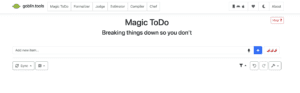
Type your Goal into the Magic ToDo where it says Add new item…
Click the blue plus sign, and then click the magic wand to break the item down.
Then break the steps down further by clicking the magic wand on steps that still seem like they will have parts, or decisions to make.
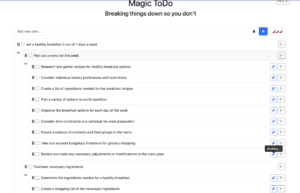
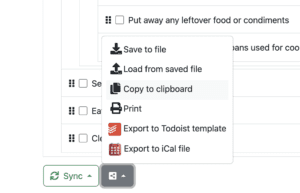
Once you get a good list… scroll down to the bottom and click on the Export button on the lower left.
Go to Copy to Clipboard.
Open the file that I have made for you located up next to your assignment submit button in Google Classroom.
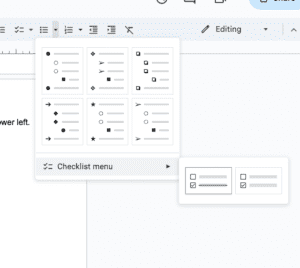
Paste your to do list below the instructions. Highlight the list, click on the bulleted list function in this Google doc,
- and select Checklist Menu with the strikethrough.
Turn in your list. I will return it to you once graded and you can use it digitally or…
You can print it in class to have a check off list. Checking things off is a mental reward to celebrate the accomplishments of making decisions and following through with actions.